Founding Product Designer · 4 weeks to ship 0.5 MVP
Team: AI/ML engineer, founding engineer, CEO, CTO

Note: Some UI has been altered across the case study to adhere to an NDA.
Hardware engineers did not trust AI to produce compliance-ready documentation. Without traceable sources or confidence signals, they couldn’t tell which claims were actually correct, so they spent hours verifying and editing AI output line by line.
A system that writes every section from the engineer’s own source files, then shows them exactly what to check and where. I designed the tool for verification and human control, not generation.
Reduction in document update time
Reduction in task completion time
Fewer UX-related support tickets
What I owned
Information architecture, user flow, visual design, interaction patterns, align the experience with familiar mental models, introducing AI trust patterns, and the design system.
THE CHALLENGE
Limited research resources and stealth nature of the startup did not allow me to interview SMEs as much as I would’ve liked to. Testing had to be done after deployment and in pieces.
CONTEXT
A chip moves through eight stages before it ships, and every stage carries its own documentation. Get one value wrong and it travels into someone else’s design, then surfaces months later as millions in cost and weeks of rework.

Problem
Engineers didn’t trust AI to produce compliance-ready documentation. Without traceable sources or confidence signals, they couldn’t tell which claims were actually correct, so they spent hours verifying AI output line by line. Only ~6% used AI-generated output without manually checking it first.
Every document was read line by line just to verify if it was correct and if it can be moved to the next stage. The current flow lacked verification and the AI could not tell if something was traceable back to it’s source correctly.
Research
Why not just use Claude? It came up in nearly every sales call, and honestly, it was a fair question. Teams already had models wired into Word through MCP. They could generate documentation, track changes, and keep moving. But none of that answered the question that mattered: Can we trust what it produced?

How a doc gets made today
01
02
03
What it costs them
THE SHIFT
These teams already had thousands of documents and fixed templates to draft them. Their bigger problem was keeping those documents accurate as the underlying design changed, while preserving the evidence and context behind every update without breaking the template.


The first flow was too cautious.
Early explorations had more steps because more steps felt safer. Every added step was another place to abandon setup, and abandoned setup is exactly how you end up with an ungrounded document.
I used the existing atomic design system in Cursor via MCP, wrote the PRD in Claude, prototyped interaction models in code, and pushed frontend PRs alongside engineering.
Prototyping and testing
I conducted A/B tests across 5 teams to get a good sense of what’s working, what’s restricting their experience and which features can be enhanced further.
What I tested

01 — Quality report
Preferred: Scores + explanations + specific findings

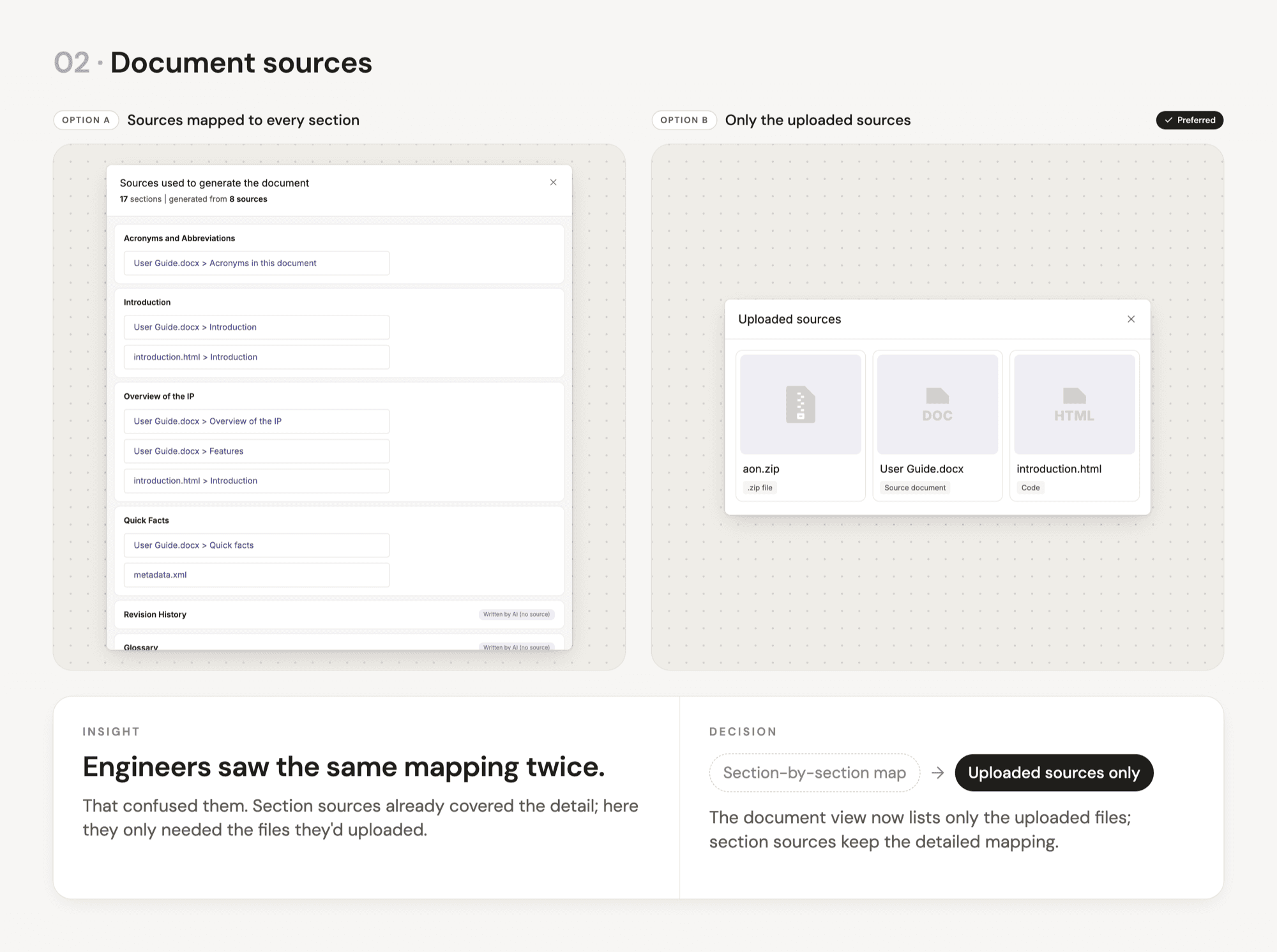
02 — Document sources
Preferred: Only the uploaded sources

03 — Section sources
Preferred: Files + line numbers + embedded evidence
Key User Insights
A score, or a list of what was missing, still left engineers to trace each issue and write the edit themselves. Each score now opens its evidence and a suggested fix, which saves review time.
Slide 01
Showing the same mapping at two levels confused engineers. The document view now lists only the uploaded files, and each section shows the exact source lines behind it, right where it is reviewed.
Slide 02
Slide 03
FINAL DESIGN
The design challenge was not just making AI-generated specs faster. It was making them reviewable, traceable, and safe to change in a high-stakes engineering workflow. I translated that goal into product decisions, using familiar UX principles to keep engineers informed and in control at every step.
01 · Make quality inspectable
Low scores expand into findings with the source quote, mismatch, location, and suggested fix. The report also flags what it could not grade.
Why?
A score without evidence is just a verdict. Showing the reasoning lets engineers check specific claims instead of rereading the draft. Flagging ungraded sections prevents unchecked content from looking verified.
02 · Keep ENGINEERS in control
Why?
By connecting issue detection directly to resolution, Spectra helps engineers close documentation gaps and resolve cross-section inconsistencies without manually tracing every discrepancy. Human approval keeps engineers in control of what changes, while continuous validation helps improve documentation quality and confidence.
03 · Make provenance visible
Every section shows its sources, including the source document, RTL file and line ranges, metadata, and other inputs.
Why?
Where did this come from is the first question in a spec review, so provenance stays attached to each section. Having a collapsible accordion allows progressive disclosure without overwhelming the user right away.

The document autosaves every hour, with milestones marking the published baseline and AI-generated revisions. Engineers can revisit earlier versions or restore a previous state, while keeping the original specification distinct from AI contributions.
Why?
In AI-native documentation, trust starts with transparency. Separating the original published baseline from AI-generated revisions helps engineers understand how the document evolves, preserve the source of truth, and maintain control over what ultimately gets published.
04 · Keep the familiar workflow
Viewing, editing, and suggesting modes let multiple people work in one document. Role-based access and pending changes control who can edit what, mimicking the Word systems chip teams use today.
Why?
This matches the real world. Architecture, design, and validation already review the same document, so one shared workspace mirrors that process. Constraints also prevent mistakes before they reach the next review cycle.

Every section has an anchor link. An always-open outline lets readers search by keyword and collapse sections by heading level, making a 50-section document easy to navigate.
Why?
Long technical documents often fail on orientation before content. Stable anchors show readers where they are and give feedback a fixed destination, even when the document changes.

Outcomes
Trust came before adoption. Engineers first tested Spectra against documents they already knew, comparing its output against established sources before using it on unfamiliar documentation. The result was less manual effort across the documentation workflow.
Fewer UX-related support tickets
Improved navigation and information architecture reduced recurring usability issues.
CVP of Software & Worldwide Applications, Lattice Semiconductor
Reflections
This project changed how I think about trust in AI products. I initially thought trust could be created by showing users a confidence score, but I learned that a number alone doesn’t create confidence. Users need to understand the reasoning, inspect the evidence, and have control over what happens next. Designing Spectra taught me that for high-stakes AI, trust isn’t something you add to the interface. It’s something you build into every interaction.
I came into the project thinking the opportunity was to reinvent how engineers create documentation with AI. Research showed me that the bigger opportunity was to fit AI into a workflow engineers already understood. That changed how I approach AI-native design. The goal isn’t always to introduce a radically new interaction model. Sometimes the strongest design is knowing which mental models to preserve, and then using AI to make those workflows dramatically more capable.